
 by
by I keep seeing the same frustration everywhere – Reddit, Discord, Twitter. Someone tells their coding agent to follow a specific pattern, the agent nails it, and then five prompts later, it acts like the conversation never happened. "Why does it keep forgetting?" "Is this a bug?" "I literally just told it that."
It’s not a bug. It’s context compression doing exactly what it’s supposed to do. But most people using coding agents – Claude Code, OpenCode, Cursor, Cline – have no idea what’s happening under the hood. They treat agents like black boxes. Magical black boxes.
They’re not magical. They’re not even that complex. And once you understand the few core concepts behind them, you’ll stop fighting the tool and start getting way more out of it.
1. Everything is prompting
If you take one thing from this post, make it this.
Every behavior you see from a coding agent – every "feature", every "skill", every "personality trait" – is the result of a prompt. A system prompt that you never see, but that’s there, shaping every response.
When Claude Code feels opinionated about code style, that’s a prompt. When it asks for confirmation before running destructive commands, that’s a prompt. When it formats responses in a certain way, that’s a prompt.
There’s no hidden reasoning engine. No special agent architecture is doing something fundamentally different from what happens when you type in a chat window. It’s an LLM receiving text and generating text. The "agent" part is a loop: prompt the model, parse the output, execute any tool calls, feed the results back, repeat.

This matters because once you internalize it, you realize that you can influence agent behavior the same way the system prompt does – by writing better instructions. Your CLAUDE.md file, your prompts, your corrections mid-conversation – they’re all part of the same mechanism. You’re not "configuring" the agent. You’re prompting it.
Here’s what a real Claude Code session looks like from the inside. This is the /context command output – it shows you exactly what’s occupying the context window:
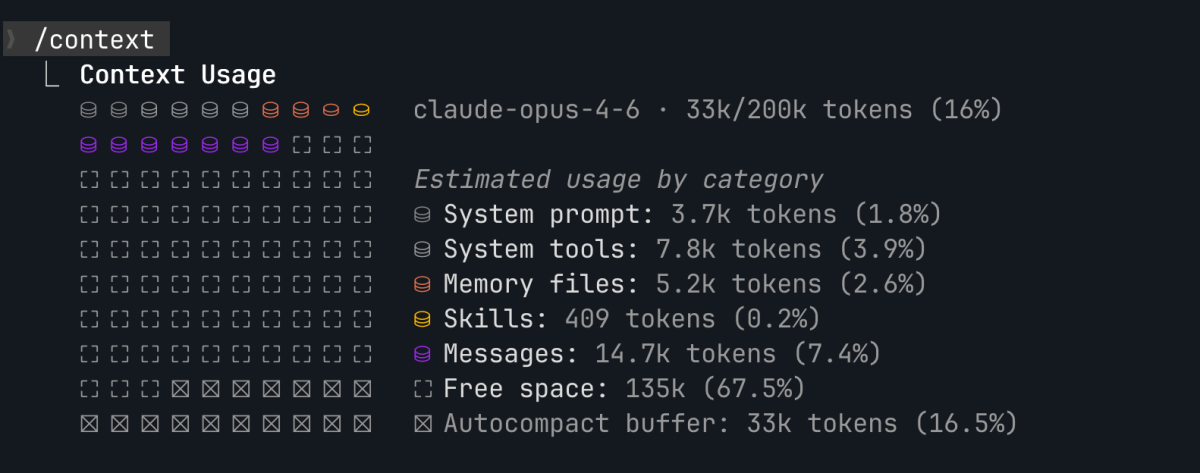
System prompt, system tools, memory files, skills, messages. That’s it. That’s the whole agent. Text in, text out. Every category you see there is just text being fed to the model before it generates a response.
2. Tools are just functions described in text
When a coding agent reads a file, runs a shell command, or searches your codebase, it’s not using some privileged internal API. It’s calling a tool. And a tool, from the LLM’s perspective, is just a JSON description of a function.
The model sees something like: "There’s a tool called Read that takes a file_path parameter and returns the file contents." That’s it. The model decides when to call it, generates the parameters, and the agent runtime executes the actual function and feeds the result back.
This is important because the model can only use tools it knows about. If a tool isn’t described in the prompt, it doesn’t exist for the model.
In Claude Code, core tools like Read, Edit, Bash, and Grep are always loaded in context. You can see them in the /context output taking up 8k tokens. MCP tools – integrations you add yourself, like Figma or Slack – are also loaded by default. But this creates a problem: if you have dozens of MCP tools, their descriptions start eating your context window before you even start working.
Claude Code solves this with on-demand loading. You can control it with the ENABLE_TOOL_SEARCH environment variable (set to auto by default, which kicks in when MCP tool descriptions exceed 10% of context). When on-demand loading is active, all those individual MCP tool descriptions get replaced by a single tool: ToolSearch.
Think of it like replacing a long menu with a search bar. The model doesn’t see "Figma screenshot tool, Figma metadata tool, Slack send message tool…" anymore. It sees: "there’s a ToolSearch tool you can call to find available tools." The system prompt tells the model that deferred tools exist and that it must search before calling them. The model doesn’t know which tools are available, but it knows something is there and how to discover it.
So when you ask the agent to take a Figma screenshot, it calls ToolSearch with something like "figma screenshot", the runtime searches across all registered MCP tool names and descriptions, and the matching tool gets loaded into context. Only then can the model actually call it. Your MCP servers are still configured in .claude/settings.json – the runtime knows about all of them, but the model only sees the ones it explicitly searches for.
Knowing this explains a lot of "weird" behavior. The agent didn’t use the right tool? Maybe it didn’t know about it. The agent called a tool with wrong parameters? It’s guessing from a text description, not from type checking. The agent keeps using cat instead of the dedicated Read tool? Its prompt tells it not to, but it’s a probabilistic model – sometimes it drifts.
3. Skills are tools you define
See the pattern? Core tools are always in context. MCP tools can be loaded on demand via ToolSearch. Skills follow the exact same pattern – they’re just tools, but ones you define.
In Claude Code, skills used to be called "commands." They got renamed, but the mechanism is the same. You create a markdown file in .claude/skills/, write instructions in it, and the agent treats it as a tool it can call.
Here’s how it works. At session start, skill descriptions (the short summary from the frontmatter) get loaded into context – so the model knows what skills exist. You can see this in the /context output: "Skills: 409 tokens." But the full skill content doesn’t load until it’s invoked. When you type /commit, the model calls a built-in Skill tool, which fetches the full markdown file and injects it into context. The model then follows those instructions.
Same mechanism as ToolSearch. Same mechanism as the system prompt. It’s all just text being loaded into context at different moments.
You can create your own skills. Write a markdown file with instructions, put it in .claude/skills/, and the agent picks it up. When I type /title-generator, the model calls Skill, loads my custom markdown file that says "given a topic, produce 5+ title options across different styles using these headline formulas…", and follows it. No different from a built-in skill.
The difference between a "built-in feature" and your custom skill is just where the text lives. Built-in skills ship with the tool. Yours lives in your project. The LLM treats them exactly the same way. It’s prompting all the way down.
4. Memory is not what you think
This is where most confusion lives.
People assume AI agents have memory the way humans do – that things said earlier in a conversation are "remembered" the way you remember what you had for breakfast. They don’t.
An LLM has no persistent state between calls. Every time the model generates a response, it processes the entire conversation from scratch. What feels like "memory" is actually the conversation history being sent as part of the prompt every single time.
This has a hard limit: the context window. For Claude, that’s roughly 200K tokens. Sounds like a lot, but tool results add up fast. Read a few files, run some commands, and you’ve already burned through a good portion of it.
What happens when context fills up
The agent compresses older messages. It summarizes or drops parts of the conversation to make room for new content. This is why agents "forget" your instructions – they got compressed away.
This is not a bug. It’s a design tradeoff. The alternative is that the conversation just stops.
Long-term memory
Context compression is a problem. If the agent forgets your instructions mid-conversation, you need a way to make things stick. That’s what long-term memory is for.
In Claude Code, there’s a memory/ directory where the agent writes notes that persist across conversations. It loads these files at the start of every session. Here’s what that looks like:

CLAUDE.md is your project instructions file – coding conventions, architecture decisions, things the agent should always know. MEMORY.md is where the agent stores things it learned during previous conversations – patterns it confirmed, preferences you corrected, decisions you made together.
Both get injected into the system prompt. Both are just text files on disk.
What this means for you
If you tell the agent something critical mid-conversation, it might get compressed away later. But if it’s in your memory files, it’ll be there at the start of every conversation.
Keep your memory files updated. That’s it. Put your coding conventions in CLAUDE.md. Let the agent save patterns and decisions to MEMORY.md. When you correct the agent on something, tell it to remember. Don’t rely on mid-conversation corrections and hope it sticks – write it down where it gets loaded every time.
5. Context is everything (literally)
What the agent produces depends entirely on what’s in its context. This sounds obvious, but the implications are not.
The agent doesn’t "know" your codebase. It knows whatever files it has read in the current session. If it makes a wrong assumption about your architecture, it’s probably because it hasn’t read the right files yet.
This is why good agents read before they write. And it’s why you should be suspicious when an agent proposes changes to code it hasn’t looked at.
A few practical consequences.
Long conversations degrade. As the context fills and compresses, the agent loses earlier information. Start new conversations for new tasks.
Don’t assume the agent "knows" something from three tool calls ago. If it’s important, restate it or put it in your project instructions.
Front-load your context. The beginning of the conversation and the system prompt get the most "attention" from the model. Put your most important constraints there.
Why this matters
You don’t need to do anything miraculous to get effective results from coding agents. You don’t need to master prompt engineering frameworks, read every paper on LLM architectures, or reverse-engineer system prompts.
You need to understand the basics. That’s it.
Context is a window with a size limit, and things get dropped when it fills up. Tools are text descriptions that the model reads and decides to call. Skills are tools you wrote yourself. Memory is files on disk that get loaded at the start. Everything is prompting.
This is your Pareto principle for AI agents. These five concepts are the 20% that solve 80% of your problems. When the agent forgets something, you know why – context compression. When it doesn’t use the right tool, you know why – it wasn’t loaded. When it ignores your conventions, you know what to do – update your CLAUDE.md.
Most people are out there fighting the tool because they skipped the fundamentals. They want advanced techniques when they haven’t understood the basics. I’ve seen this pattern before in software development, and it never ends well. You can’t debug what you don’t understand.
Understanding how the machine works is always the first step. It was true before AI agents, and it’s true now.
Thanks for reading!
We want to work with you. Check out our Services page!