On this page
The comment started with three words: This breaks prod.
It was a PR of about five hundred lines — in a repo I had just encountered, and I was’t the one who wrote it. An agent did, after opening three files the diff didn’t show.
Weeks later, the same agent let a bug through to staging, and it stayed there for twelve days. Between those two stories sits what an AI can do in a code review, and what it can’t.
In my first weeks on this project, about 25 PRs were created weekly, across two repos I had never opened.
I would open a diff, read it, understand every line, and still not be able to say whether it was right. Because "right" depended on things that were not in the diff: the conventions the team followed, the screen that component drew, the other endpoint that called the same route.
Approving like that is signing off on something you did not check. And a green CI makes that far too comfortable. Your name stays on the PR, and the bug nobody saw ships to production with your approval next to it.
The review I wanted to do was the ideal one. You check out the author’s branch, run what there is to run, and confirm nothing broke. You check whether the new test tests anything, or whether it would pass without the fix. You stress it: log in as the role that should not see that screen, shrink the window until the table overflows, submit the empty form. And you check whether the PR fits the house, whether it uses the helper and the pattern the neighboring module already adopted, or reinvents everything.
Doing that for 25 PRs a week, in code I did not know, did not add up.
And much of that code had been written by an agent. If one agent wrote it, could another one do the review I had no time for? And if it could not do all of it, which part could I hand over?
One number to keep in mind before answering: ask people why they review code and the top answer is finding bugs. Bugs are only 14% of what reviews actually produce.
What we look for in a review
That number comes from Alberto Bacchelli and Christian Bird, who studied code review inside Microsoft in 2013. They observed 17 developers reviewing, interviewed each of them, and surveyed 873 programmers and 165 managers.
Finding bugs is the top motivation for 44% of programmers and 44% of managers. But when the authors classified 570 review comments, defects ranked in fourth, at 14%.
Both lists from the study
One of the questions was: why do you do code review? Each person picked their top three reasons, and the authors ranked them by score:
- Finding defects
- Code improvement
- Alternative solutions
- Knowledge transfer
- Team awareness
- Improving the development process
- Avoiding build breaks
- Shared code ownership
- Tracking rationale
- Team assessment
And the nine categories of the 570 comments:
| Category | Comments |
|---|---|
| Code improvement | 29% |
| Understanding (questions and doubts) | ~22% |
| Social communication | ~15% |
| Defects | 14% |
| External impact | ~5% |
| Testing | ~4% |
| Review tool | ~3% |
| Knowledge transfer | 2% |
| Misc | ~6% |
NOTE: the values marked
~are read off the paper’s chart. The exact ones (29%, 14%, and the 12 knowledge transfer comments) are in the text.
The largest slice, 29%, is code improvement, which is exactly style and convention: use the practice the team already uses, remove dead code, make it readable. Second comes understanding, people asking what something does and why. The authors heard the same thing in the interviews, without asking:
the most difficult thing when doing a code review is understanding the reason of the change
To understand, reviewers read the description, try to run the changed code, email the author, and 20% to 40% of the time get up and go talk in person. Owners of the changed files don’t even read the description: they go straight to what they know. Everyone else gets stuck. "Not knowing files (or [dealing with] new ones) is a major reason for not understanding a change."
I did not know a single file.
A decade later, Turzo and Bosu hand-classified 2,500 comments from OpenStack Nova and asked 160 developers to rate how useful each kind was. What developers value most is what shows up least: functional defects, validation, and logic top the ratings and add up to only 19% of comments. Documentation and code organization make up more than 40%.
Turzo and Bosu’s table
| Category | Usefulness rating (1-5) | % of comments |
|---|---|---|
| Functional defect | 4.38 | 0.48% |
| Logical | 4.11 | 2.28% |
| Question | 3.99 | 13.56% |
| Documentation | 3.73 | 33.32% |
| Organization of code | 3.68 | 7.68% |
A reviewer that doesn’t need to be human
I started with the obvious: use AI to gather the context I did not have. It reads the ticket, the CLAUDE.md, the ADRs and the surrounding code before looking at the diff. The first version was a skill I invoked in Claude Code, in the terminal, one PR at a time. Soon after, it became cc-harness: a small program around Claude Code that takes a PR number, picks the right skill for the repo, runs the whole review on its own, and hands me the result in a file, so I read it before posting anything.
Along the way, I went and actually studied code review, and it turned into a study with more than twenty reading notes. The sentence I wrote down early on sums up where I landed:
Code review did not become obsolete. It became more necessary. But what we look for in it changed.
And one decision came out of the reading: I gave up on the idea that an agent that reviews needs to behave like a human. The question became "what should a machine reviewer do that a person wouldn’t?".
Some things are only cheap for a machine. Opening the docstring three files away to see if it is still true. Finding every caller of a route. Booting the app for every single PR, without getting lazy, at four in the afternoon on a Friday.
Collina’s checklist
The review skill did not start from scratch. Matteo Collina publishes the skills he uses to work on Node.js. One of them, nodejs-core, has a rule called reviewing-prs.md: the guide he follows to review core PRs. Commit message, scope, tests, documentation, CI. And a red flags section I really like:
Tests that would pass without the fix: the test doesn’t actually exercise the changed code path. Verify by mentally (or actually) reverting the fix and checking if the test would still pass.
I took that skeleton and adapted it to the project. Collina’s blocks are still there, with nearly the same names: Scope and size, Commit messages, Quality red flags, and the bar for when to request changes and when to approve with comments. On top went the house rules: authorization as its own axis, backend and frontend patterns, environment variables.
But Collina’s checklist delegates execution to CI. It asks whether CI passed and shows how to read the result. Running things locally is something it tells you to suggest to the contributor. For Node core, that makes complete sense: the CI is huge and there is no screen to look at.
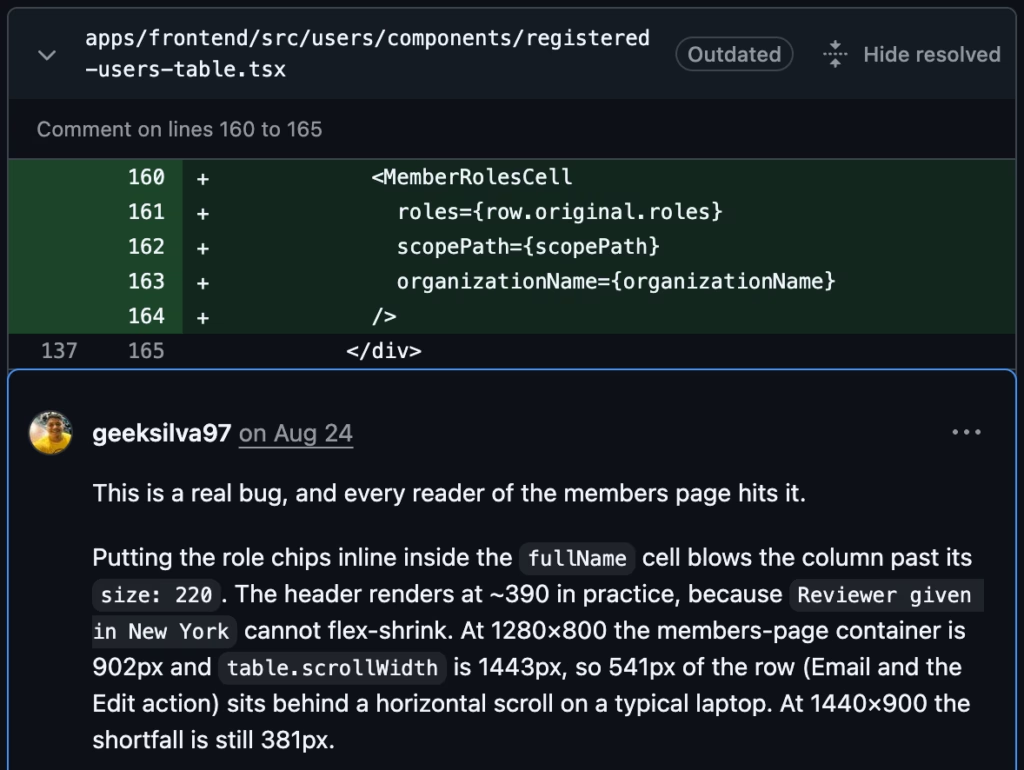
On this project, the story is different. In one PR, the members table started overflowing the screen. At 1280×800, the container was 902px and the table was 1443px, and the Email and Edit columns sat behind a horizontal scroll. No test measures width, so CI had no way to catch it, and a diff does not show pixels.
It is like reviewing a kitchen’s floor plan and never opening a drawer. The plan can be right and the drawer can still hit the fridge.
The review starts running things
So the review started running things on its own. For each PR, the agent:
- creates an isolated
git worktreeat the PR’s commit, outside my working tree; - runs typecheck, lint and tests, with MySQL in a throwaway container;
- serves the PR’s own frontend on port 3100 (never 3000, which is serving my branch);
- opens the app in Chrome through the Chrome DevTools MCP, logs in, goes to the changed flow and tests it.
Screenshots are only evidence. What confirms a layout problem is measuring, with evaluate_script, on the real DOM. That table was caught this way, at 1280 and again at 1440:
When the backend can’t boot, the frontend runs on the MSW handlers the project already has. The agent turns them all on, seeds a test organization, and marks every tweak with // REVIEW SCRATCH: Not part of the PR. so nobody mistakes mock behavior for the PR’s behavior.
NOTE: MSW hides things too. In one PR, the screen showed Make and Model just fine because the mock served those fields. The backend never sent them. The bug only surfaced by reading the transformer. Running the app does not replace reading the code – it adds to it.
"This breaks prod."
That comment from the opening had no screen at all.
In the legacy app, a PR of about five hundred lines turned on cursor pagination for a transactions route. The author had done their homework: they checked the eight other callers of the function they changed and concluded the change was purely additive.
The AI went after the callers of the route, not the function. It found three screens that still paged by offset, and all of them would start returning the same rows on every request. The comment opened with three words:
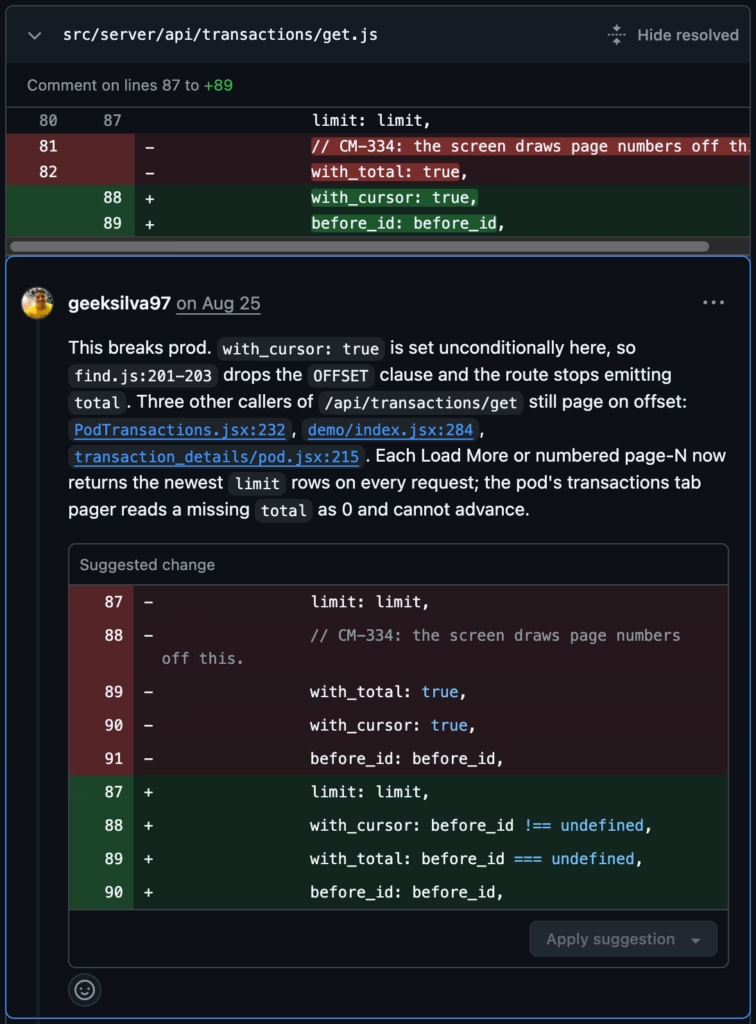
The author replied an hour and a half before the merge: "this was a real prod break", along with the commit that fixed it. It never reached production because something opened three files the diff did not show, and that nobody had a reason to open.
How the harness works
cc-harness has almost no agent code. In the post about the harness via the SDK, I showed the claude-agent-sdk preset that turns on Claude Code’s tools, system prompt and loop in two lines. The project’s AGENTS.md locks that in as a rule: "The point of this project is that the SDK already is the harness."
// trimmed from src/index.ts
const result = query({
  prompt,
  options: {
    tools: { type: "preset", preset: "claude_code" },
    systemPrompt: { type: "preset", preset: "claude_code" },
    settingSources: ["user", "project", "local"],
    skills: [reviewSkill, "humanizer"],
    mcpServers, // read from the harness's own .mcp.json
    permissionMode: "bypassPermissions",
  },
});
settingSources brings in my environment: the same skills and plugins I use in interactive claude, symlinked into ~/.claude/skills. Edit a SKILL.md and it applies to the next review and the next terminal session. humanizer always rides along, to cut filler. At first I wanted the review to read like a person wrote it; later I saw there was no need at all. It is an AI review, and what matters is that it does its job.
What the harness adds sits around that, in a bash wrapper called cc-review. It detects the repo from the git remote, never from the folder name, and picks the skill:
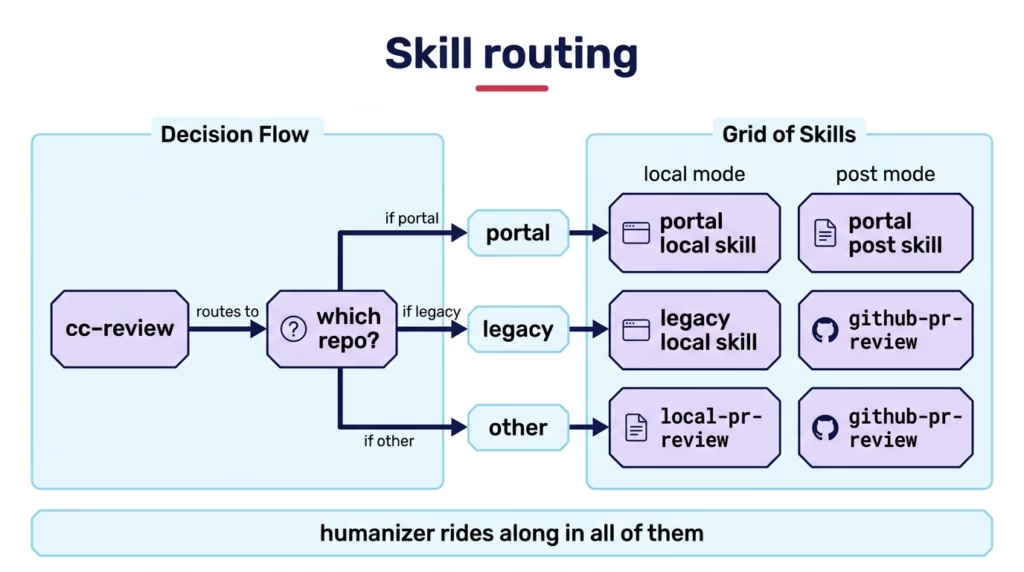
That split came from a mistake. I tried to make one skill serve both repos, and pointed at the legacy app it demanded authorization policies and an MSW layer that repo does not have. The comment left in the script is, to me, the most important sentence in the project:
The wrong one does not merely miss things, it asserts things the repo does not have.
Inside the skill, the review always follows the same ten steps, recorded in the agent’s own task list. That list is what cc-status reads to report which phase a review is in:
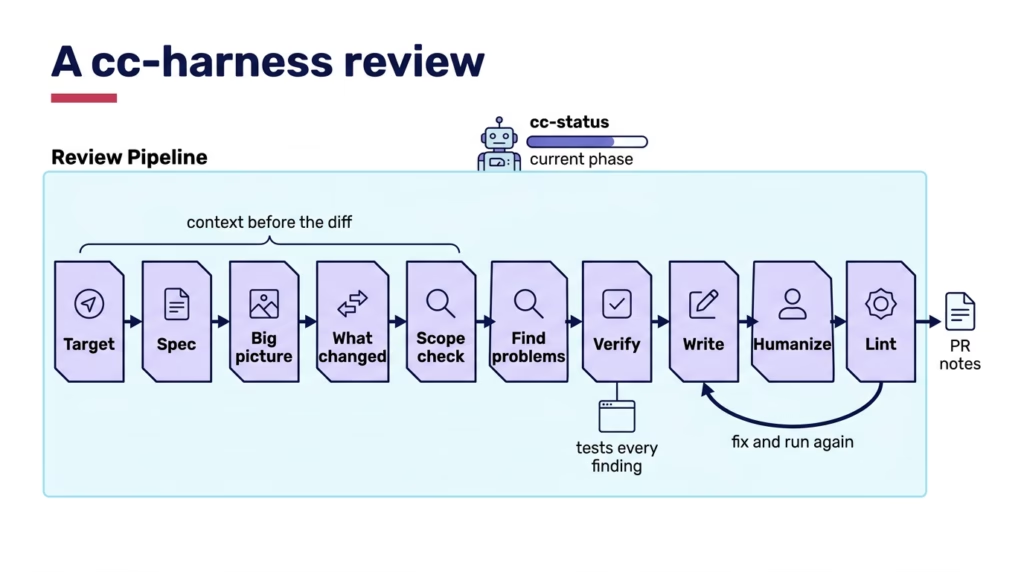
Two lines from the skill sum it up. In Big picture: "A diff can be locally correct and still wrong for the system." In Verify, where every finding is tested before it becomes a comment: "A killed false positive is the system working."
The output is a notes file with a fixed layout. In local mode, which is what I use most, nothing goes to GitHub: I read it, cut what I disagree with, and only then post. One comment, as it sits in the file:
<!-- anchor path="apps/frontend/src/users/components/member-roles-panel.tsx" start_line=88 line=90 side=RIGHT -->

This is a real bug.

When `holdsNoneHere` is true the field reads `No role in this group` and
nothing else, so the `< 2` guard hides the toggle. [...]

```suggestion
          {everyGroup.length < (holdsNoneHere ? 1 : 2) ? null : (
```

*Verified: read the branches in `member-roles-panel.tsx` for a member with one
grant on another branch [...] `everyGroup.length` is 1, and the button renders nothing.*
The anchor carries the file and lines the GitHub API needs, and a linter checks each one against the diff before anything gets posted. The proof line, *Verified:* when the agent tested it and *Inferred:* when it only read it, never goes to the PR. It exists for me, when I decide whether a finding stays.
Twelve days
In another PR, the AI asked for a change: the documentation said disconnection was event_code=2, and the code used 1.
The author disagreed and changed the documentation to 1. On re-review, the AI read it again, saw code and documentation agreeing, and was satisfied. The PR went in.
Twelve days later, staging showed that disconnection is 2. For those twelve days, the last_disconnected field showed the last connection. Anyone who looked at it saw the wrong information, with all the confidence of a well-named field. It never reached production, but it sat there the whole time.
You can tell this as an AI failure. I tell it as expected behavior.
In the first review, code and documentation disagreed, and that is something it can check. In the second, they agreed. Which number the device actually sends is not in the diff. It is in the vendor’s documentation, in the device itself, in the head of someone who knows the system. A suspicious reviewer would have asked why the documentation changed in the same PR as the code. The agent doesn’t ask, because from inside the PR there was nothing left to check.
The AI checks. A human attests to what is right. That part I don’t delegate.
Two passes
That is why the project’s workflow has two passes:
cc-harnessdoes the first one and always posts the review asCOMMENT. The AI does not approve and does not block.- A human does the second one and decides:
APPROVEorREQUEST_CHANGES.
Heander, Söderberg and Rydenfält sat next to ten developers through 34 real reviews. Almost half of what goes through a reviewer’s head is trying to understand the context and the rationale of the change, and tools ignore that part: reviewers go looking for it in Jira, in chat, in the docs. The first five steps of the pipeline are that search, done before I get there.
I pulled the project’s PRs from August 14 until today. The AI reviewed 79. Of the 30 findings it marked critical or high, 28 were confirmed. Across all its findings, 54 were correctness bugs, 23 were missing tests or tests that did not test anything, and 45 were code conventions.
NOTE: this is little data: six weeks, one team, two repos, and I classified the severity myself with an agent’s help. And it does not show that the AI finds more than a human, or the opposite, because the two passes almost never landed on the same PR.
A review with the app running takes about 12 minutes and costs a median of US$ 7.57. That is expensive for a one-line PR and cheap next to broken pagination in production.
Build your own
cc-harness and the project’s skills are private. But I wrote a generic version of the skill for this post, review-that-runs, with Collina’s skeleton and the rules that paid off most. It knows nothing about my project, and learns yours as it goes:
npx skills add Codeminer42/skills --skill review-that-runsIt needs two things in your Claude Code. The first is an authenticated gh. Since it only reads the PR and never posts, you can run it with a read-only fine-grained token, scoped to the repos you review, with Contents, Pull requests and Metadata set to Read-only. gh uses whatever token is in GH_TOKEN:
GH_TOKEN=github_pat_... claudeWith that token, when you do post the review, you post it with your usual gh. The skill never had permission to.
The second is the Chrome DevTools MCP:
claude mcp add chrome-devtools -- npx chrome-devtools-mcp@latestThen ask for review PR 123 inside the repo. It creates the worktree, runs the gates, boots the app if the PR touches a screen, and writes pr-123-review-notes.md without posting anything. The rules I consider non-negotiable sit at the top:
- validation means the real app, running in Chrome, not reading the diff;
- every finding ends with
*Verified:*or*Inferred:*, and no proof means no comment; - any mock tweak made to run the app is marked
// REVIEW SCRATCHand named in the overview; - the review goes out as
COMMENT, and approving is a human’s call.
And when you post, the review closes with a single line: First pass by review-that-runs. Approving is a human’s call. Whoever opens the PR knows where it came from, and knows the sign-off still belongs to someone.
If you want to go further, the original reviewing-prs.md rule is in Collina’s skills repository, and the Agent SDK’s claude_code preset, which I showed in the previous post, runs the same skill outside the terminal.
Your team will notice on the first PR where the review arrives with the table width measured in pixels, or with the three callers the diff did not show.
Checking and attesting
I still get about 25 PRs a week. The difference is that when I open one, the context is already on the table: the screen was opened, the tests were questioned, the callers were found, and every finding comes with its proof.
What is left for me is the part that does not fit in the diff. Knowing that the device sends 2.
Every piece of the harness exists so that my sign-off requires less attention. But it is still a sign-off. When I approve, I know what I am signing.
Thanks for reading!
If you want to dig deeper:
- Expectations, Outcomes, and Challenges of Modern Code Review, by Bacchelli and Bird. Ten pages that still explain much of what we do in a review.
- Code Review as Decision-Making, by Heander, Söderberg and Rydenfält. The best picture I have found of what goes on in a reviewer’s head.
We want to work with you. Check out our Services page!